Microsoft Access Services
MS Access Enterprise Resource Planning (ERP)
Custom-Built ERP Lite Solution for Logistics, Distribution & Warehousing
Overview
For logistics companies and warehousing businesses, managing multiple operations-like order tracking, stock management, vendor coordination, and invoicing-can get chaotic without a centralized system. That’s where the MS Access Enterprise Resource Planning (ERP) solution comes in. This ERP Lite system is designed to streamline your day-to-day processes using Microsoft Access. Built with logistics workflows in mind, it allows teams to handle sales orders, track stock, generate reports, and manage vendors-all from a single, integrated interface. Unlike cloud-based ERP platforms, this solution runs locally, supports multi-user environments, and can be customized to your exact operational needs. Whether you manage a single warehouse or multiple locations, this ERP tool improves accuracy, transparency, and control across your business operations.
What Is the MS Access Enterprise Resource Planning (ERP) Tool?
Create and track sales orders in a structured and auditable way.
Receive and manage inventory stock across locations with visual alerts for low stock.
Generate dispatch reports and track pending deliveries or backlogs.
Issue monthly sales and inventory reports with one click.
Manage customers and vendors from a dedicated interface.
Support multiple users with role-based login access and password protection.
Seamlessly export reports to Excel for further analysis or sharing.
By using familiar tools like Access and Excel, businesses can onboard quickly-no technical training required.
Who Should Use This ERP Lite System?
Logistics Companies managing sales, dispatch, and inventory across warehouses.
Distribution Firms handling stock inflow, order fulfillment, and vendor purchases.
Manufacturers or wholesalers needing central visibility of orders, inventory, and sales.
Startups and SMBs that need ERP functionality without investing in complex platforms.
Non-technical teams looking for a familiar, Access-based interface that works offline.
If your operations are currently managed via spreadsheets or disconnected tools, this Access ERP provides the structure and control you need-without the overhead of cloud-based software.
Secure Role-Based Login System
Admin
Full control over users, data, and system settings.
Sales/Operations
Access to create orders, manage items, and monitor reports.
Warehouse/Inventory
Ability to receive stock, check inventory, and manage vendors.
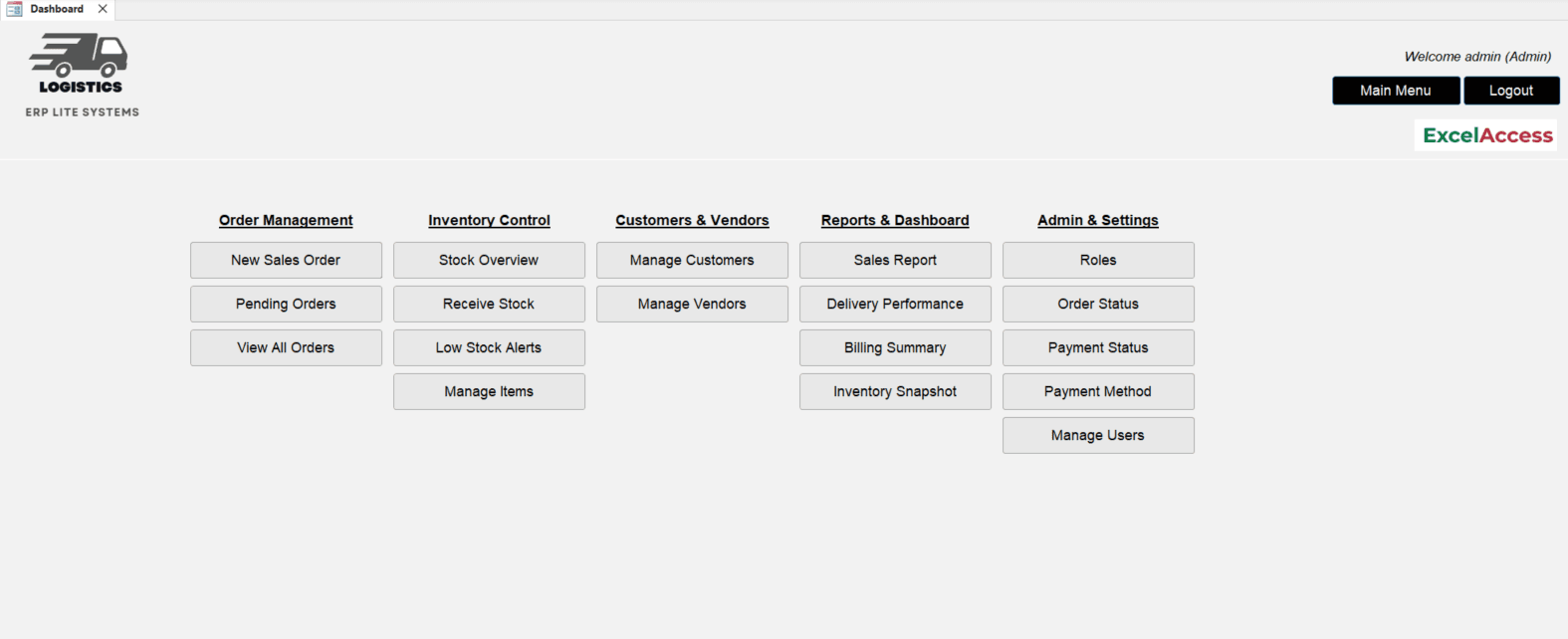
Admins can easily add or deactivate users via the 'Manage Users' interface on the dashboard-ensuring full control over who can access and modify business-critical data.
Dashboard Overview: Your Command Center
New Sales Order:
Create a new customer order by entering item details, quantity, pricing, and delivery terms.
Pending Orders:
View all sales orders that are not yet fulfilled or dispatched for follow-up and tracking.
All Orders:
Access the complete list of orders-both completed and pending-for review or reporting.
Receive Stock:
Log incoming inventory from vendors, including item details and quantities received.
Stock Overview:
Get a real-time snapshot of current inventory levels across all items in the system.
Low Stock Alerts:
Instantly identify items that have dropped below the reorder threshold using color-coded alerts.
Manage Items:
Add, edit, or deactivate products in your catalog with item name, category, and unit.
Manage Customers:
Maintain your client database with names, contact details, and billing information.
Manage Vendors:
Track supplier information, purchase history, and contact details for procurement.
Sales Report:
Generate a monthly summary of sales performance by product, client, or date range.
Inventory Snapshot:
View and export a summary report of all stock on hand for audits or restocking decisions.
See the ERP System in Action
Preview real screenshots of the MS Access ERP System interface and modules below.
Order Management Made Easy
Create New Sales Orders
Step One:
Click 'New Sales Order' and a structured form opens where you can input customer details, order date, item details (quantity, item name, unit price), delivery terms, and remarks.
Step Two:
Once saved, the order becomes part of your live sales database, ready for dispatch or follow-up.
Track Pending & All Orders
Need to review what’s still open? Use the 'Pending Orders' button to filter only active orders. Want a full view? Click 'All Orders' to list completed, pending, and cancelled orders.
Inventory Control with Alerts & Visibility
Receive Stock
From the dashboard, click 'Receive Stock' to log new items received from vendors. A detailed entry form allows you to add supplier info, enter item names, batch numbers, and quantities, and tag the warehouse location. This action updates the inventory in real-time.
View Stock Overview
Click 'Stock Overview' for a snapshot of what’s currently in your warehouse, categorized by item. Low-stock items are automatically color-coded, making it easy to prioritize reordering.
Item, Customer & Vendor Management
Manage Items
Add, edit, or deactivate items with name, SKU, unit type, and category.
Manage Customers
Maintain detailed records including name, address, phone, and email.
Manage Vendors
Track supplier contact details, purchase history, and performance.
Having this information easily accessible supports quicker order entry and better customer service.
Powerful Reporting Built In
Sales Report
Generate a monthly sales report with one click-ideal for management meetings, performance reviews, or audits. It includes totals by product, region, or customer.
Inventory Snapshot
View a summary of stock balances at the end of the month or anytime needed. Helps with physical audits, replenishment planning, or end-of-period analysis.
All reports can be exported to Excel or printed directly from the system.
Integration with Outlook & Excel
Excel Export
For all reports and transaction logs.
Outlook Email Integration
Send emails from within Access for updates, invoices, or notifications (customizable).
This ensures seamless communication with stakeholders-without relying on external tools.
Benefits of Using This MS Access ERP Tool
Affordable & Subscription-Free
No ongoing costs-just a one-time build or customization fee.
Offline-Ready
Works in shared network environments without internet dependency.
Multi-User
Supports concurrent access for operations, sales, and warehouse teams.
Customizable
Tailored features can be added based on your business needs.
Easy to Use
Minimal training required; based on familiar Microsoft products.
Getting Started
1.
Open the tool in MS Access.
2.
Log in using your assigned role.
3.
Begin creating orders, managing stock, and generating reports.
4.
Reach out to us for any customization or professional support.
Final Thoughts
The MS Access Enterprise Resource Planning (ERP) tool offers logistics and warehouse-based businesses the power of an ERP system-without the cost, complexity, or steep learning curve. Whether you're scaling operations or simply want tighter control over stock, orders, and vendors, this system gives you the structure you need to grow with confidence.